Out-of-band management gives every server its own web interface. That is excellent for one machine and unworkable for a hundred. We built a unified console for a data centre operator so an entire PowerEdge estate — across sites and environments — is read from one place: health, hardware inventory, drift, faults and the reports that come out of them.
What iDRAC is, and where it stops.
iDRAC — the Integrated Dell Remote Access Controller — is a small computer built into every Dell PowerEdge server, on its own chip with its own network port and its own power. It runs whether the server is booted, halted or switched off.
It is how a server is managed without standing in front of it: open its BIOS and firmware settings, power it on or off, mount an ISO, watch the console, read every temperature and fan and power supply, and pull a complete description of the hardware inside — every memory module, every drive, every network port, down to the slot and the bay. Engineers call this out-of-band management, because it works independently of the operating system on the machine.
It is genuinely excellent, and it has one hard limit: iDRAC only ever knows about the server it lives in. There is no fleet view, because there is no fleet — there is one controller per server, each with its own address, its own login and its own private, complete picture of exactly one machine.
“What is inside this server, and what is wrong with it?” — completely, for one machine, for free, on hardware you already own.
“How much memory do we own?” “Which hosts are behind on BIOS?” “Which drives are wearing out?” “What do we need to buy next year?” Every one of those spans the estate, and nothing in the box spans the estate.
The data to answer all of it already exists. It is sitting inside every controller in the estate, and nobody has time to open them one at a time. That gap is what this console closes.
Every server knows itself. Nothing knew the fleet.
iDRAC is a good answer to “what is wrong with this server?” and no answer at all to “what is wrong with the estate?” Each host holds a complete description of itself behind its own login. Multiply that by a rack and the information needed to plan a refresh, price a support contract or find a failing drive is technically available and practically out of reach.
One tab per server
Answering a fleet-wide question means opening every out-of-band interface in turn and copying numbers into a spreadsheet.
Faults hide in plain sight
A degraded drive or a fan running hot sits inside a file nobody reads until something stops.
Planning runs on guesswork
Capacity and refresh decisions get made from memory because assembling the real numbers takes days.
Audits are manual
Producing a component inventory for procurement or compliance meant opening machines one at a time.
Every iDRAC, read from one screen.
The console as it actually ships. Every figure below is aggregated from the same hardware exports iDRAC already produces — no agent, no logins to your servers.
Scroll the image sideways to read it.
The estate in one screen
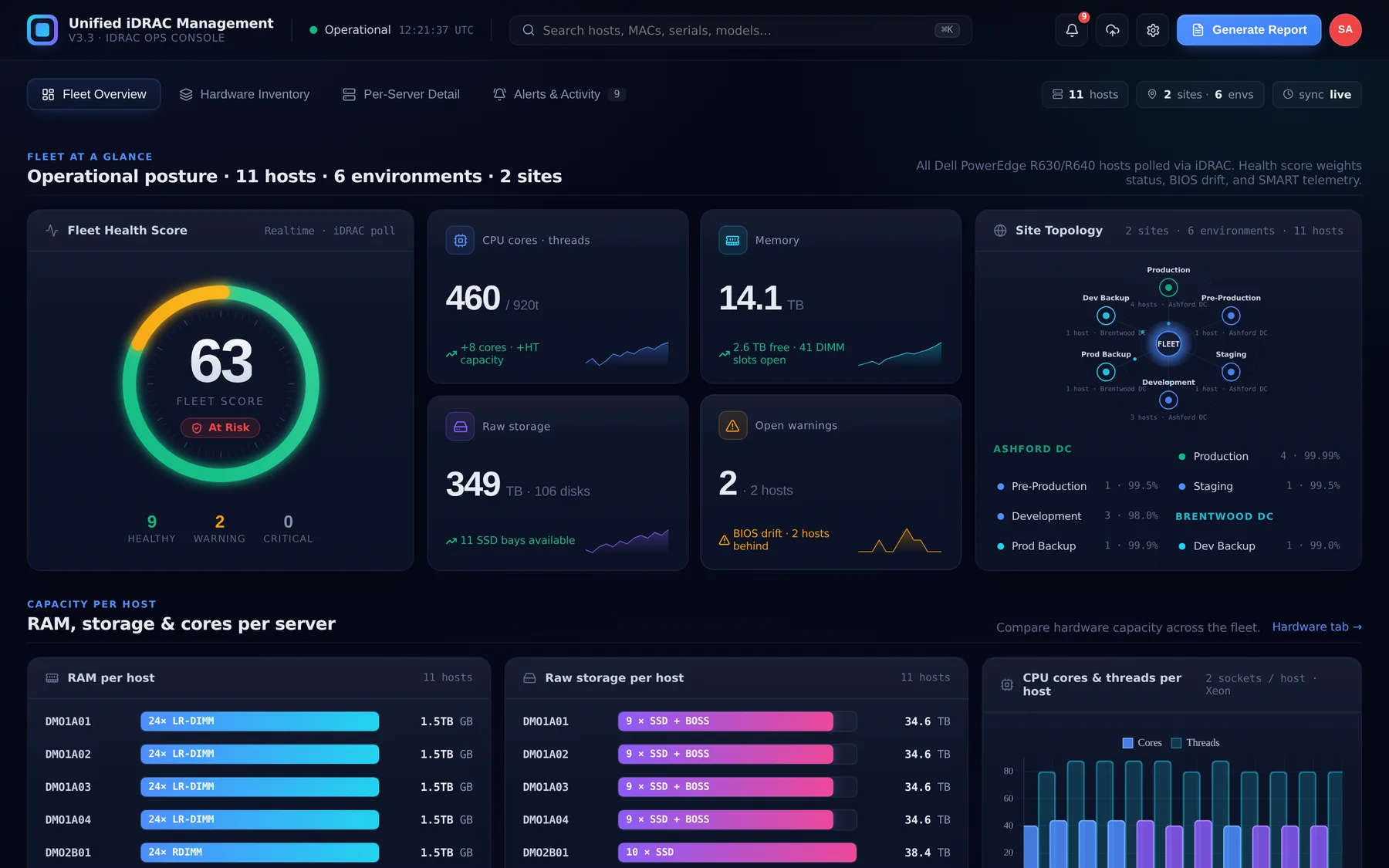
A single health score for the whole estate, weighted across host status, BIOS drift and drive telemetry — with total cores, memory, raw storage and open warnings beside it, and a topology map showing which environment sits in which data centre.
Real screens from the shipped console, running on demonstration data. Hostnames, site names, service tags and MAC addresses are fictional — no client estate is shown.
Read the estate, then read one machine.
Fleet-level answers at the top, full component detail one click down.
Whole-fleet composition
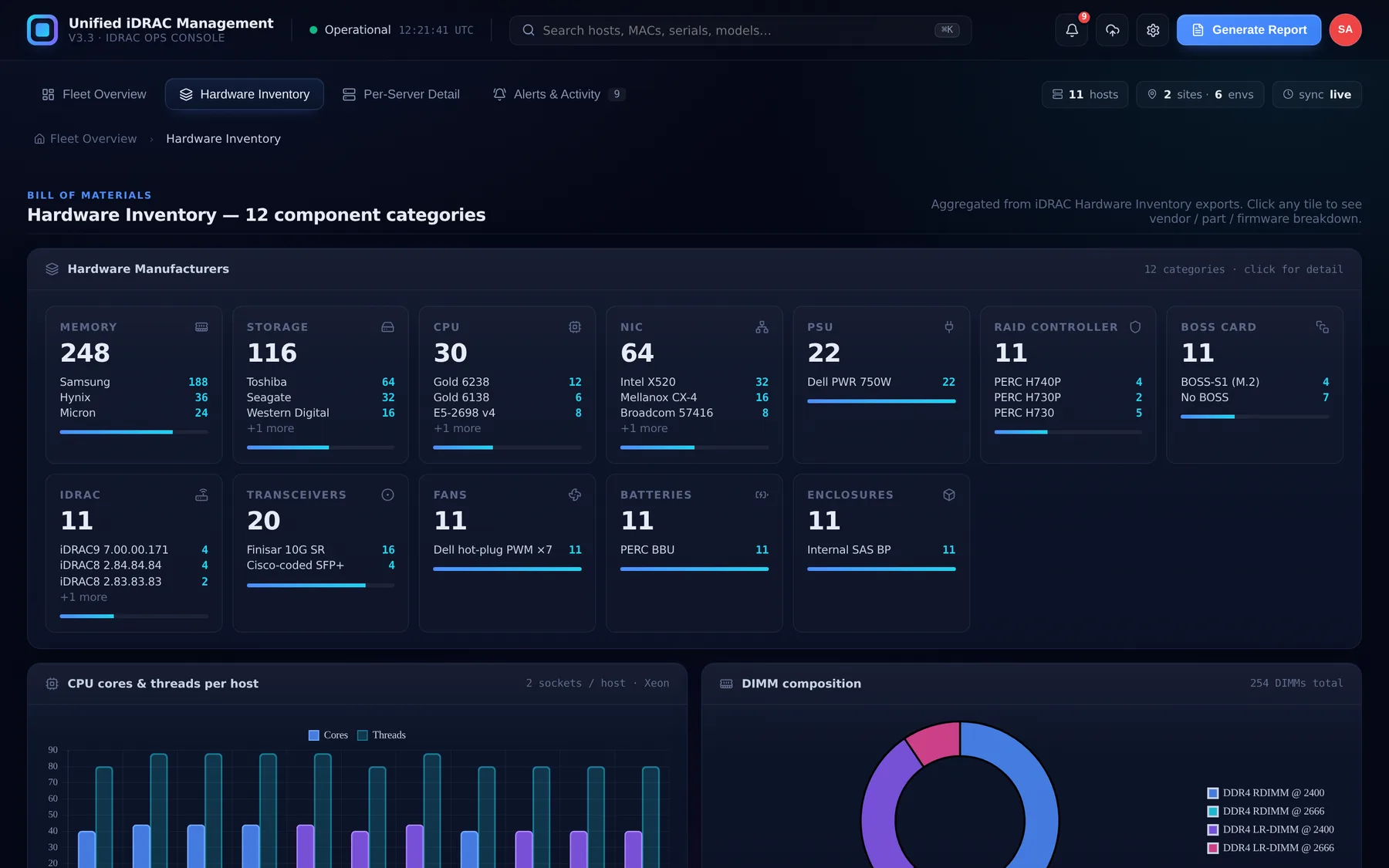
A single matrix showing what the estate is actually made of — processors, memory, drives, controllers, network cards, power supplies — with per-node breakdown beneath it. The question “how many of X do we have, and where?” stops requiring a spreadsheet.
Per-server drill-down
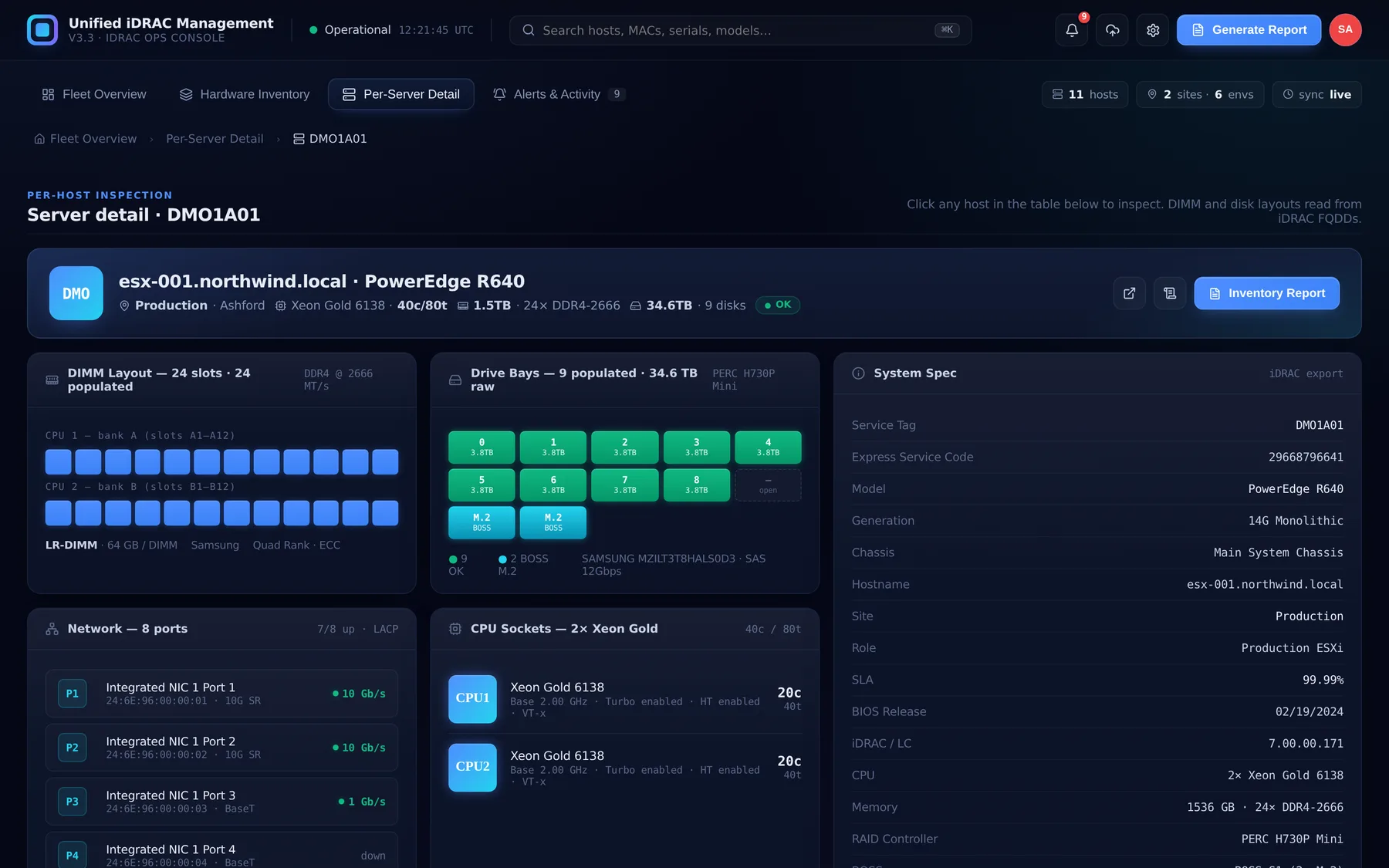
Click any row for the full picture of one machine: system identity, processor and core counts, populated memory slots, physical and virtual disks, RAID controllers, network interfaces, power supplies and fans — everything the export carries, laid out to be read.
Memory analysed by speed
Installed memory is grouped by rated speed, not just total capacity. Selecting a band shows exactly which servers carry it — which is how you find the machine quietly running slower memory than its neighbours.
Storage, physical and logical
Physical drives with manufacturer, model, capacity, bus protocol and remaining write endurance, alongside the virtual disks built on them — and which drives participate in which RAID set.
Chassis bay view
A front-panel representation of the drive backplane, so bay position maps to the drive occupying it. When a disk needs replacing, the person walking to the rack knows which bay before they set off.
Issues surfaced, not buried
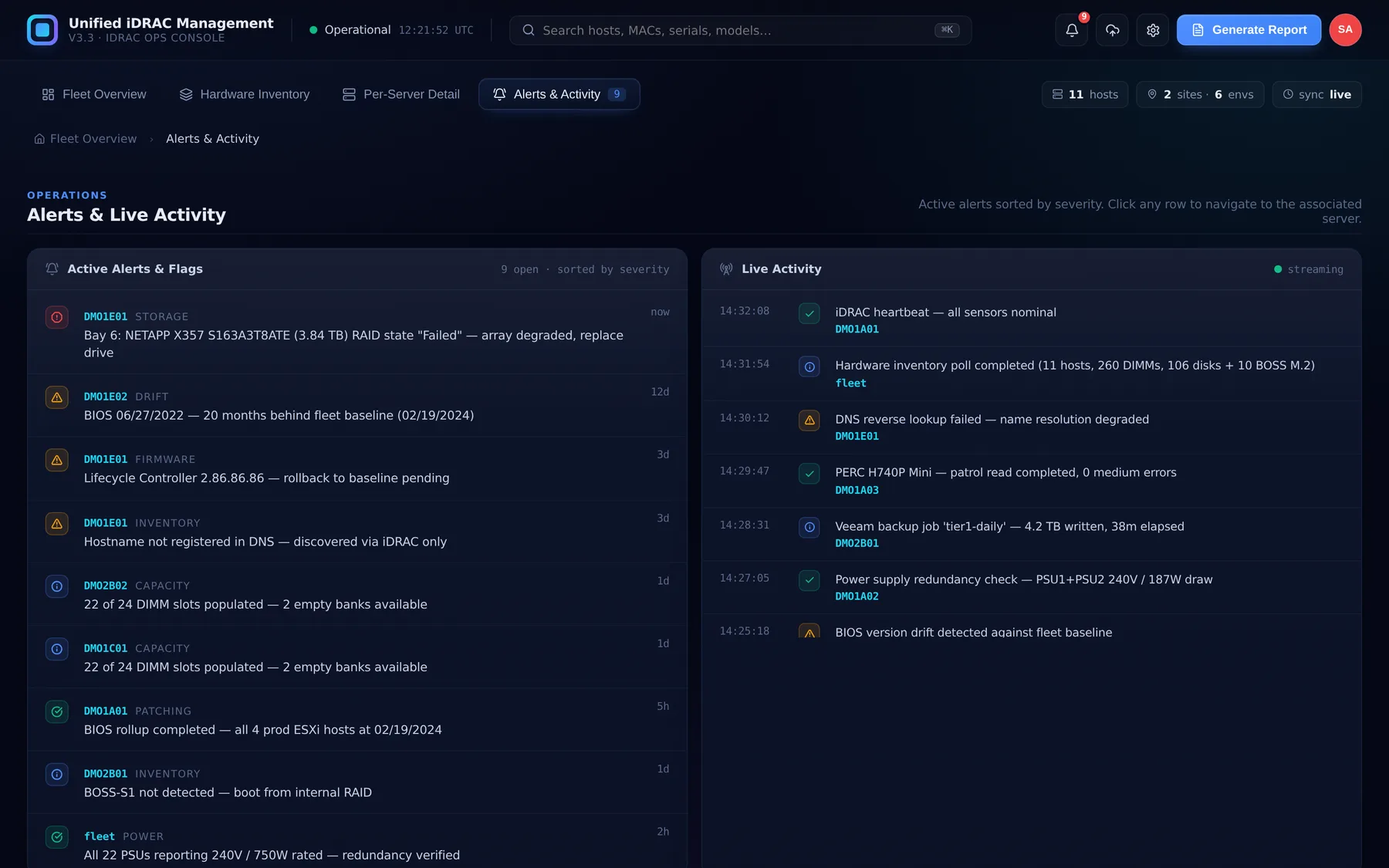
Faults, degraded components, wear approaching thresholds and configuration inconsistencies are collected into one list. The estate reports its own problems rather than waiting to be interrogated.
Manufacturer breakdown
Component vendors across twelve categories, aggregated fleet-wide. Useful for support contracts, firmware planning, and knowing how much of the estate depends on any single supplier.
Asset metadata layer
Hardware exports know what a machine is, not what it is for. A metadata layer adds the operational context — ownership, purpose, commissioning detail — kept alongside the inventory and importable so it survives the next refresh.
Reports and export
An executive briefing generated on demand for audits, board packs and procurement rounds, plus CSV export so the same data can go into whatever the finance or asset system already uses.
Fleet health scoring
One number for the estate, weighted across host status, firmware and BIOS drift, and drive telemetry — with the hosts dragging it down listed beneath. A morning check that takes a glance rather than a walkthrough.
Sites, environments and SLA
Hosts are grouped by site and by environment — production, pre-production, staging, development, backup — each carrying its own availability target, so a fault in development is not read with the same urgency as one in production.
Role-based access
Operations, inventory, procurement and compliance need different views of the same estate and different rights over it. Access is granted per capability — who may upload, who may edit inventory, who may manage alerts, who may pull procurement reports — rather than everyone sharing one login.
The architecture is the security model.
A tool that describes your infrastructure in detail is a liability if it is also a service that stores it. This one keeps the data where it already lives, and controls who may do what with it.
Teams responsible for more hardware than headcount.
Data centre and colocation
Estates where physical access is slow and knowing what is in a rack before you walk to it saves the trip.
Managed service providers
Multiple estates to account for, each needing its own inventory and its own report.
In-house infrastructure teams
Small teams who need the fleet to describe itself rather than being catalogued by hand.
Regulated environments
Estates where inventory data is not permitted to leave the network, and a hosted SaaS tool is not an option.
Common questions.
Does anything need to be installed on our servers?
No. It works from the configuration exports the servers already generate. Nothing is deployed to the estate, no agent runs on any host, and no management credentials are entered into the tool at any point.
Does our inventory data leave our network?
No. Everything is parsed and rendered locally in the browser — there is no server component, no upload and no database holding your estate. Hardware inventory is sensitive, and the safest architecture for it is one with nowhere to send it.
Does it hold our iDRAC passwords?
No. It reads the configuration exports iDRAC produces; it does not log in to your servers, and no out-of-band credentials are entered into it. The console does have its own user accounts, because different teams need different rights over the same estate — but those govern access to the console, not to your hardware.
Can different teams see different things?
Yes. Access is granted per capability rather than per person — viewing across sites, uploading exports, editing inventory metadata, managing alerts, generating procurement reports and administering users are separate rights. An inventory administrator and a procurement analyst can share the estate without sharing each other's controls.
Is this limited to Dell and iDRAC?
It was built around iDRAC because that is what the estate ran. The parsing layer is where vendor specifics live, so extending it to another platform's out-of-band export format is a contained piece of work rather than a rebuild.
Can you build something like this for our estate?
Yes — this is client work, not a shrink-wrapped product, and it was shaped around how one operations team actually worked. We scope your environment and reporting needs first, then quote a fixed price before any work starts.
Got an estate nobody can describe in one place?
Most of the software we build starts as something a team was doing by hand. Book a free 30-minute call — we'll scope it honestly, including telling you if it isn't worth building.
- 01Your estate — how many hosts, how many sites, what you run
- 02What you need to answer — inventory, drift, faults, procurement, audit
- 03Where the data lives — and whether it may leave your network
- 04A fixed price — in writing, within 24 hours of the call